


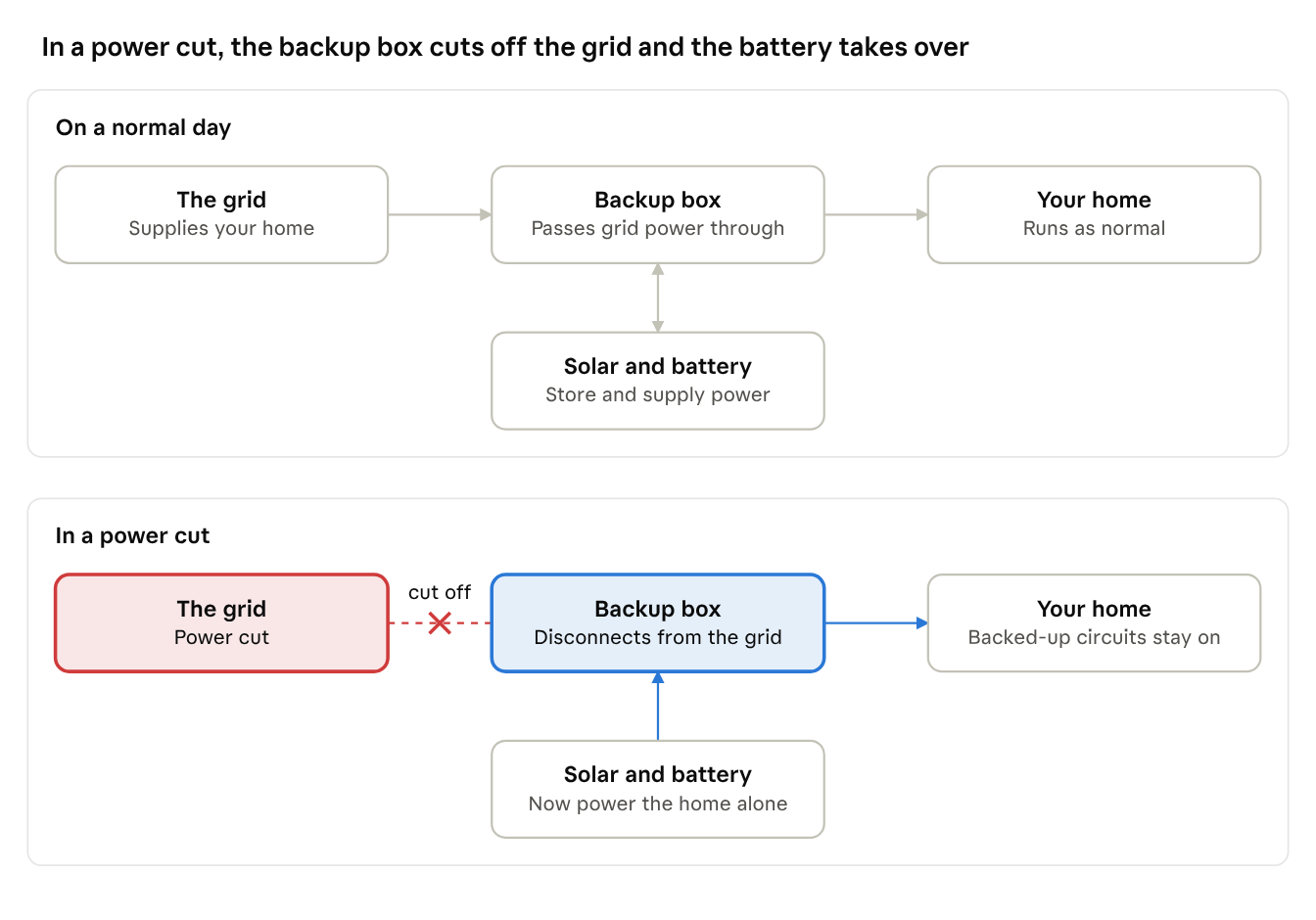
how a backup box works · normal day vs power cut
The grid has to be cut off first, so no power can flow back onto lines that engineers may be working on. How much of your home stays on depends on the backup level you choose in Step 1.
Step 1: What do you want to keep running?
There are four levels of backup. The higher the level, the more of your home stays on, and the more work the installation involves and so the higher the likely cost will be!
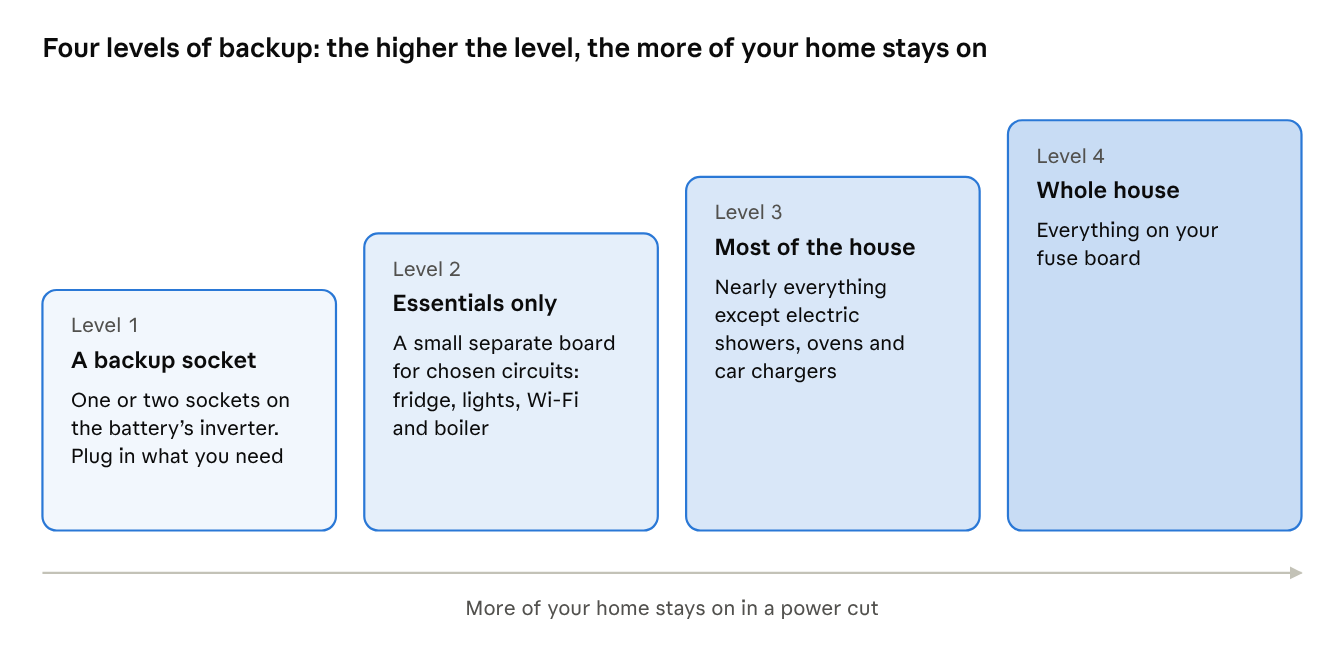
the four backup levels · one socket to the whole house
| Level | What stays on in a power cut | Good for | Installation | Issues |
|---|---|---|---|---|
| 1. A backup socket | One or two sockets on the battery's inverter. You plug in what you need. | Fridge, phone chargers, a lamp | Simplest. Often no extra box. | The backup plug is usually on the battery and so any devices that aren't directly adjacent to the unit will need an extension cable, these are usual limited output |
| 2. Essentials only | A small separate fuse board for chosen circuits, such as fridge, lights, Wi-Fi and boiler. | Keeping the basics going | Moderate. A backup box plus a second fuse board. | This can be a separate distribution board so can do certain limited demand circuits, moving the circuits into this board can be a lot of work and prohibitively expensive, often whole house is simpler but can be cheaper for limited circuits |
| 3. Most of the house | Nearly everything, except very power-hungry items like electric showers, ovens and car chargers. | Everyday life carries on | More involved. Your fuse board is split into backed-up and grid-only circuits. | Usually the power of the unit is limited so may backup most of the loads but not the heaviest like electric AGA's or electric showers, can be expensive as it can mean replacing a distribution board but depends on house setup |
| 4. Whole house | Everything on your fuse board. | Homes that want no compromise | Most involved. All your power passes through the backup box. | Usually simple to install, can provide power for the whole house, performance is usually limited by the inverter sizing or the battery size and what it can supply |
Even with whole-house backup, your battery can only supply so much at once. Running the shower, oven and kettle together during a power cut may overload it (see "What else affects your backup" below).
Step 2: How fast does it need to switch over?
When the power cuts out, the backup box has to disconnect your home from the grid and switch to the battery. How long that takes decides what you notice. Backup boxes fall into three speeds:
- Instant: under 0.02 seconds, faster than a blink. Most things carry on as normal.
- Flicker: up to half a second. Lights blink and many electronics restart.
- A few seconds: everything goes off, then comes back on.
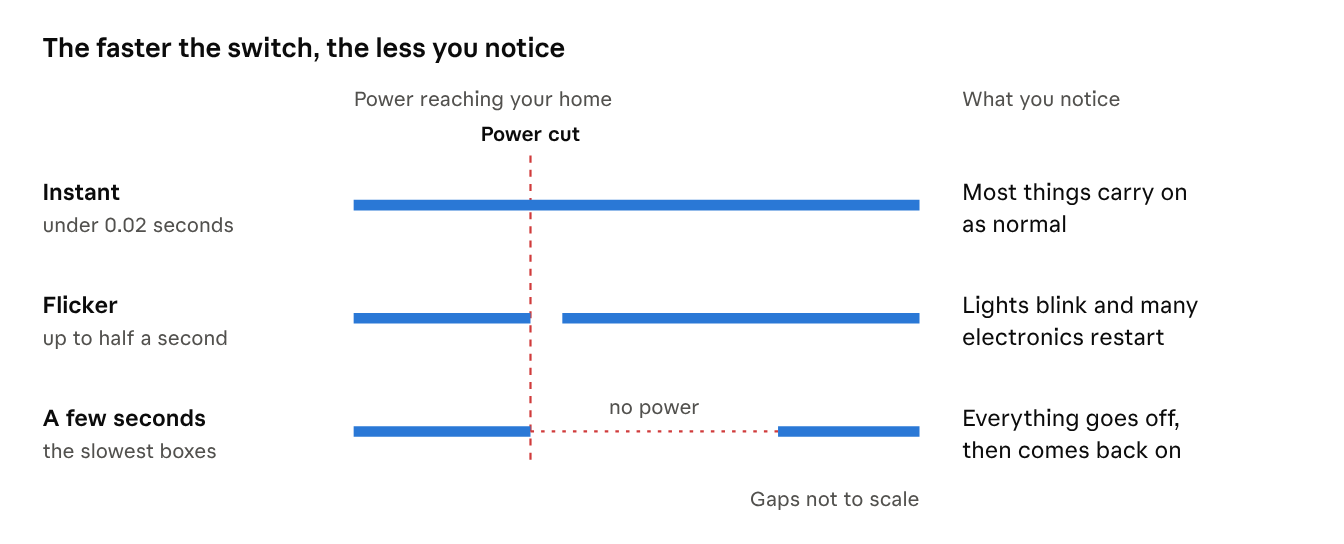
switchover speed · instant, flicker, a few seconds
What that means for your home
| Appliance | Instant | Flicker | A few seconds |
|---|---|---|---|
| Lights | No change | Blink | Off, then back on |
| Wi-Fi router | Stays connected | Likely restarts; offline for a few minutes | Restarts; offline for a few minutes |
| TV and set-top box | Usually no change | May switch off or restart | Restarts; may need switching back on |
| Desktop computer | Usually no change | Likely switches off; unsaved work lost | Switches off; unsaved work lost |
| Fridge and freezer | No change | Restarts by itself | Restarts by itself |
| Gas or oil boiler | Usually no change | May reset; some need a manual reset | May reset; some need a manual reset |
| Heat pump | Usually no change | May stop and wait several minutes before restarting | Stops and waits several minutes before restarting |
| Oven and microwave clocks | No change | May reset to 00:00 | Reset to 00:00 |
If you work from home, game online, or run a heat pump, choose an instant-switching box. If you only need the fridge and lights to come back on, a slower box will do.
Never rely on any home backup system for medical or life-support equipment. That equipment should have its own dedicated battery backup.
Step 3: Do you want a generator as a second backup?
A battery eventually runs flat, especially in winter when solar panels produce little, although you can charge the battery from overnight power and set a reserve level for backup. If a long power cut is your main worry, a generator gives you a second, independent source of power.
Some backup boxes can start a generator automatically when the battery runs low, and stop it again when power returns. Depending on how the system is set up, they can also run it briefly from time to time to check it still works after standing idle. Two of the units in this guide do this in full: the Sigen Gateway HomePro SP-F and the EcoFlow Gateway. The Growatt box also has a basic generator connection. If a generator might be part of your plans, even later, choose one of these.
Find your match
Your battery brand decides which backup box you can have, so if you already have a battery, start with that brand in the next table.
| If you want… | Look for | Units that fit |
|---|---|---|
| Just the fridge and a few lights | Essentials only; any speed | Growatt SYN 50-XH-10, or a backup socket on the inverter |
| Everything to carry on without you noticing | Whole house; instant | Sigen HomePro SP-F, EcoFlow Gateway, Enphase IQ System Controller 3, Alpha Backup Gateway-S, Tesla Backup Gateway 2 |
| Whole house on a budget, and a short restart is fine | Whole house; a few seconds | Fox ESS EPS Box |
| The option to add a generator later | Generator-ready | Sigen HomePro SP-F, EcoFlow Gateway |
| Whole house with a smaller main fuse | Whole house; instant | Anker SOLIX Power Dock Pro (we check your fuse size) |
The eight backup units in plain English
| Backup unit | Works with | What it can back up | Switch speed | Generator-ready |
|---|---|---|---|---|
| Sigen Gateway HomePro SP-F | Sigenergy SigenStor batteries | Whole house or part | Instant | Yes |
| EcoFlow Gateway | EcoFlow PowerOcean batteries | Whole house or part | Instant | Yes |
| Enphase IQ System Controller 3 | Enphase batteries and micro-inverters | Whole house or part | Instant | No |
| Alpha ESS Backup Gateway-S | Alpha ESS SMILE-G3 batteries | Whole house | Instant | No |
| Tesla Backup Gateway 2 | Tesla Powerwall | Whole house or part | Described by Tesla as seamless; no figure published | No |
| Anker SOLIX Power Dock Pro | Anker SOLIX X1 batteries | Whole house if your main fuse is 63 A or smaller; otherwise most of the house | Instant | Not yet |
| Fox ESS EPS Box | Fox ESS batteries | Whole house | A few seconds | No |
| Growatt SYN 50-XH-10 | Growatt batteries | Essentials only | Flicker | Basic |
"Instant" means the manufacturer quotes 0.02 seconds or less. See the note at the end of this guide on why that is not guaranteed.
Why your home may need an earth rod
Most UK homes get their electrical earth through the power company's cable. That earth is what makes fuses and safety switches (RCDs) cut the power if something goes wrong. When the backup box disconnects your home from the grid in a power cut, that earth is disconnected too. So any backup that powers your home's wiring needs its own earth.
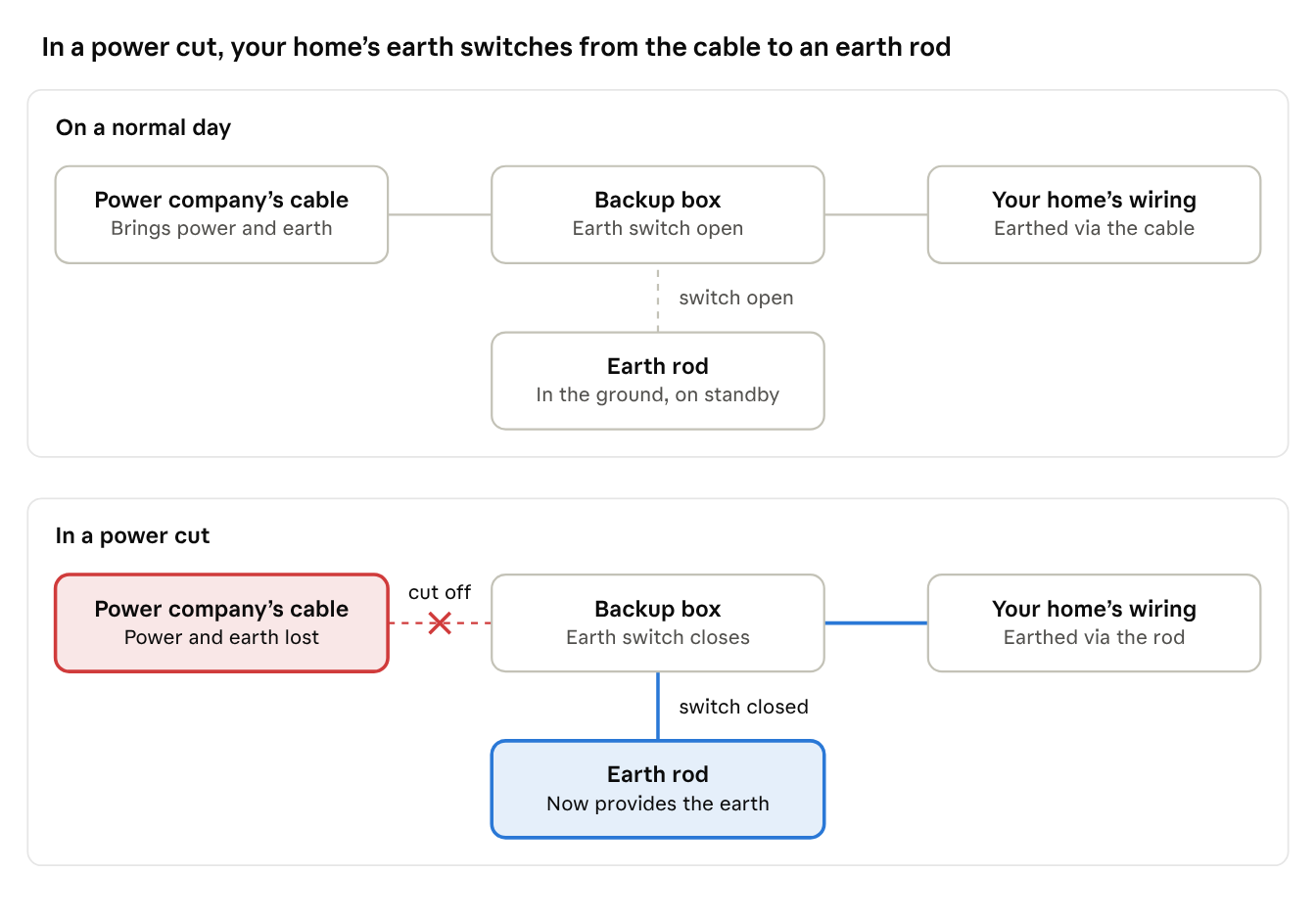
where your earth comes from · normal day vs power cut
What the installation involves
- An earth rod. A copper rod is driven into the ground outside, usually over a metre long, with a small cover so it can be inspected later.
- An automatic earth switch. This connects your home to the earth rod only during a power cut, and disconnects it when the grid comes back. It is either built into the backup box or fitted next to it.
- Testing. We measure how well the rod connects with the ground. Dry, rocky or sandy ground may need a longer rod or a second one.
- Extra safety switches. Backed-up circuits may need their own RCD protection, checked to work with the earth rod.
What this means for you
- We need a suitable spot outside: soil rather than concrete, and clear of pipes and buried cables. Occasionally that means lifting a slab or cutting through a path.
- It adds time and cost to the installation, which we include in your quote after a survey.
- The rod should stay accessible so it can be retested during future electrical checks.
What else affects your backup
The backup box decides what can stay on. Your battery decides how much and for how long.
- Power (kW): how much at once. Many home batteries supply about 3.6–6 kW in a power cut. That covers lights, fridge, Wi-Fi, TV, a boiler and a kettle or microwave, but not all at once with an electric shower (8–10 kW) or a car charger.
- Storage (kWh): how long. A 10 kWh battery might run the essentials for a day or more, or a busy whole house for a few hours.
- Solar. Most systems recharge the battery from your panels during a power cut, but winter output is low. So if winter power-cuts longer than a day are the concern generators may be a useful addition
- Heat pumps. These draw a lot of power, especially at start-up. Check with us whether yours can run on backup and for how long.
- Backup reserve. You can set the battery to always keep some charge back for power cuts. The more you reserve, the less you save day to day.
Important: seamless backup is not guaranteed
Switch-over times such as "0 ms", "instant" or "seamless" are manufacturers' figures, measured under test conditions. In your home, an uninterrupted changeover cannot be guaranteed. Whether your equipment notices a power cut depends on:
- how much power is being used at the moment the grid fails: if it is more than the battery can supply, the system will shut down or trip;
- how charged the battery is, and the backup reserve you have set;
- the type of grid fault: a slow voltage drop or flickering supply can take longer to detect than a clean cut;
- system settings and software updates;
- how sensitive each appliance is to small disturbances.
There may also be a brief interruption when the grid comes back and the system reconnects. Treat home battery backup as a convenience, not a guaranteed supply. Anything that must never lose power, such as medical equipment, needs its own dedicated uninterruptible power supply (UPS).
Talk to Sunuser
Sunuser has been fitting solar and battery systems since 1981, with more than 50,000 installations nationwide. Every backup system starts with a survey: we check your main fuse, your earthing, where an earth rod can go and which circuits you want to keep running. Then we recommend the backup box that fits your home and your budget, and include everything in one clear quote, backed by our 2-year installation guarantee.
Call 0113 262 0261 · Email solar@sunuser.co.uk · Visit www.sunuser.co.uk